Turn Your Digital Space into an Interactive Platform with XR (Expanded Reality) and AR (Augmented Reality) enhancements

A 3D virtual tour is a powerful starting point — but with the right interactive add-ons, it becomes a tool that can inform, engage and support teams across every sector. From branded visitor experiences to AR, training, asset management and project tracking, these enhancements turn your digital space into a practical platform for communication and decision-making.
EC2XR brings together a range of technologies including Captur3D, ARConnect, Zuant3D, SIM-ON and STAGES. Each adds a different layer of value, whether you’re improving visitor engagement, capturing leads, supporting operations, or managing complex multi-site environments. Choose the features that match your goals and build the digital experience your organisation needs.
Which add-on do you need?
For marketing, visibility and online engagement
For insurance, surveying and reinstatement
For design, planning and AEC workflows
For operations, facilities and multi-site management
For visitor engagement, interpretation & training
Add-ons for marketing, visibility & online engagement

Google Street View Publishing
Publishing your Matterport tour directly to Google Maps for public viewing.
- Boosts visibility and SEO.
- Helps visitors preview your venue before arrival.
- Increases trust and engagement for hospitality, retail and culture.
- 360° scenes published to Google Maps
- Linked panoramas for natural navigation
- Can update or replace existing Street View imagery

Virtual Staging (via Captur3D)
Digital furnishing and styling added to your 3D tour.
- Show empty or unfinished spaces at their best
- Present multiple layout or design options
- Reduce physical staging costs and time
- Ideal for hospitality, commercial interiors and event spaces
- High-quality furniture and décor sets
- Multiple style themes
- Applied directly inside the virtual tour
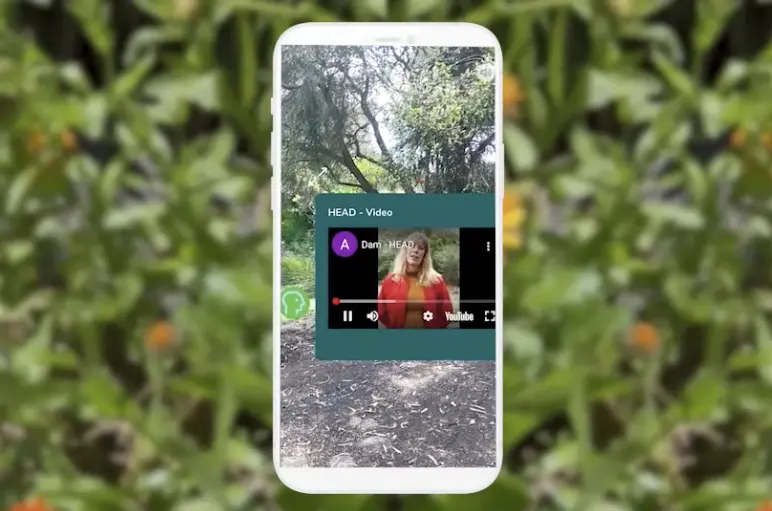
Media-Rich Overlays & Navigation (Captur3D)
Turn your 3D tour into a fully branded, interactive experience that keeps visitors exploring.
Add storytelling, promotional content and guided paths
Strengthen your brand identity within the tour
Increase engagement, enquiries and dwell time
Deliver clear, enjoyable navigation for audiences
Custom UI, branding and menu layouts
Video, audio, text and PDF embeds
Interactive content hotspots
Viewer behaviour analytics to understand interest

VRBO 360 Publishing
Publishing a 360° view of your property to VRBO (and feeds compatible with other booking platforms).
- Improves booking confidence.
- Shows layout and amenities clearly.
- Reduces pre-booking questions and cancellations.
- Exported panoramic scenes
- VRBO-compatible formatting
- Works alongside Matterport’s standard model link
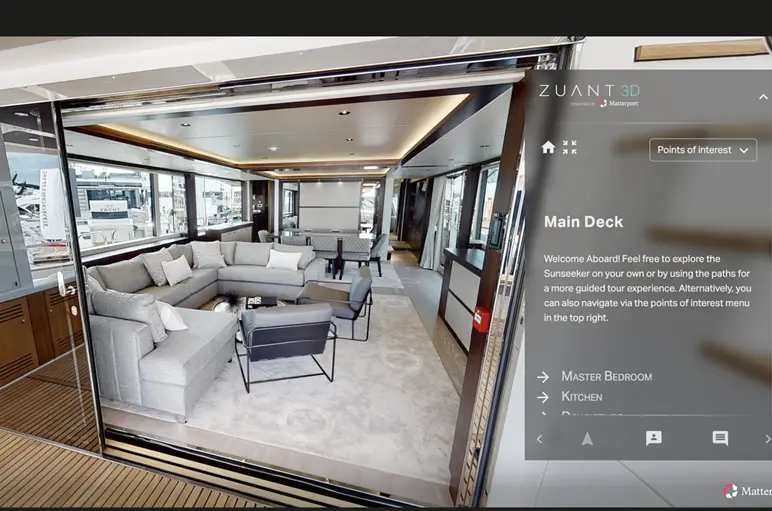
Guided Engagement & Lead Capture (Zuant3D)
Interactive tours enhanced with forms, guided paths and CRM integration.
- Capture leads inside the tour
- Perfect for events, exhibitions and sales teams
- Create curated journeys for visitors or prospects
- Lead-capture forms
- Guided navigation flows
- CRM and follow-up integrations

Read more about 3D virtual tours in your sector
Commercial
Restaurant • Retail
Arts and leisure
Gallery • Museum • Gymnasium • Sports facility
Industry
Office • Manufacture • AEC
Healthcare
Doctor • Dentist • Optician • Hospital
Education
Schools • Nurseries
Heritage and Faith
Historical sites • Places of worship
Insurance
Domestic • Commercial
Add-ons for insurance, surveying & reinstatement

TruePlan for Xactimate
A professionally produced set of floor plans, elevations and CAD-ready drawings generated directly from a Matterport scan.
- Speeds up insurance estimating and reinstatement.
- Removes manual measuring and sketching.
- Reduces errors and disputes.
- Accepted directly within Xactimate.
- Floor plans
- Roof plans (where applicable)
- 2D and 3D CAD assets
- Delivered in Xactimate-ready format

Matterport Sketch File
A clean, simplified floor-plan layout produced from a Matterport model — ideal for smaller claims or quick quoting.
- Fast overview of room shapes and sizes.
- Useful for insurance, FM, lettings and planning.
- Reduces time spent measuring and redrawing on site.
- Basic plan layout (not full TruePlan)
- Exportable geometry
- Works with common drafting tools

BIM File (Matterport BIM Models)
A BIM model generated from a scan — ideal for design, planning and documentation.
- Saves time creating existing-conditions models.
- Useful for architects, surveyors and contractors.
- Reduces guesswork in refurbishment and expansion projects.
- Revit-compatible BIM files
- Accurate geometry and structure
- Captures MEP elements at a basic level (where visible)

E57 File
A high-density point cloud generated from the Matterport scan.
- Provides precise measurement data.
- Imports easily into CAD, BIM and modelling software.
- Supports clash detection, planning and verification.
- Standardised E57 point-cloud file
- Accurate LiDAR-derived geometry
- Compatible with Revit, AutoCAD, ArchiCAD, Rhino, etc.

MatterPak
A bundle of technical assets extracted from a Matterport model.
- Useful for architects, engineers, and 3D visualisation teams.
- Speeds up modelling and refurbishment workflows.
- Gives downstream teams a clean starting point.
- OBJ file – textured mesh
- Point cloud (.XYZ)
- Reflected ceiling plan image
- Floor plan image

Schematic Floorplan
Simple black-and-white floor plans generated from your 3D tour.
- Fast, affordable and ideal for visitor information, lettings and basic planning.
- Clear layouts for clients, contractors or public-facing documents.
- No need for manual measurements.
- Delivered as PNG/PDF
- Room labels and dimensions
- Single- or multi-storey layouts
Add-ons for design, planning & AEC workflows

Augmented Reality (ARConnect)
Place 3D elements in the real world using a phone or tablet.
- Help users visualise proposed layouts or equipment
- Great for exhibitions, planning and visitor wayfinding
- Enhances learning and interpretation experiences
- QR-code activation
- Full-scale 3D object placement
- Works alongside your virtual tour

Project Stages, As-Built Verification & Time-Lapse Records (STAGES)
Stage-by-stage comparison of a site across the project lifecycle.
- Track progress and verify work remotely
- Reduce site visits for clients and consultants
- Ideal for construction, refurbishments and heritage work
- Time-lapse stage viewer
- As-built vs plan comparisons
- Shareable links for stakeholders
Add-ons for operations, facilities & multi-site management

Smart Building Operations (SIM-ON)
An interactive 3D interface for asset management and IoT-enabled building control.
- Manage facilities and assets visually
- Reduce time spent locating equipment or documents
- Ideal for multi-site operations, campuses and healthcare
- IoT device integration
- Maintenance tasks and asset records
- Operates directly within your digital twin

Project Stages, As-Built Verification & Time-Lapse Records (STAGES)
Stage-by-stage comparison of a site across the project lifecycle.
- Track progress and verify work remotely
- Reduce site visits for clients and consultants
- Ideal for construction, refurbishments and heritage work
- Time-lapse stage viewer
- As-built vs plan comparisons
- Shareable links for stakeholders

Media-Rich Overlays & Navigation (Captur3D)
Enhance your digital twin with clear, structured information directly inside the tour.
Add essential procedures, safety notes and asset information
Standardise training and onboarding across sites
Make complex environments easier to navigate remotely
Improve clarity for FM teams, contractors and visitors
Custom menus for routes, zones and assets
Embedded video, audio, documents and manuals
Clear step-by-step workflows inside the tour
Analytics to see what teams view or need most
Add-ons for visitor engagement, interpretation & training

Guided Engagement & Lead Capture (Zuant3D)
Interactive tours enhanced with forms, guided paths and CRM integration.
- Capture leads inside the tour
- Perfect for events, exhibitions and sales teams
- Create curated journeys for visitors or prospects
- Lead-capture forms
- Guided navigation flows
- CRM and follow-up integrations

Augmented Reality (ARConnect)
Place 3D elements in the real world using a phone or tablet.
- Help users visualise proposed layouts or equipment
- Great for exhibitions, planning and visitor wayfinding
- Enhances learning and interpretation experiences
- QR-code activation
- Full-scale 3D object placement
- Works alongside your virtual tour

Media-Rich Overlays & Navigation (Captur3D)
Custom menus, branding and interactive content layered on top of your tour.
- Turn your tour into a guided, branded experience
- Add storytelling, learning content or sales information
- Improve visitor engagement and clarity
- Custom UI menus and navigation
- Video, audio, text and PDF embeds
- Analytics dashboard for viewer behaviour